In short:
We have identified a section that needs to be completed on your local workstation.
Unfortunately, we are unable to make these changes on your machine, so please contact your IT Administrator for assistance.
Required steps on the local workstation:
- Select Start, type Registry Editor, and open it.
- Navigate to the following registry key:
HKLM\Software\Policies\Microsoft\Windows NT\Terminal Services\Client - Create or modify the following value:
- Name: RedirectionWarningDialogVersion
- Type: REG_DWORD
- Data: 1
P.S If the above steps are not completed, this issue will continue to occur each time.
You can refer to the Microsoft Article
You can refer to the Microsoft Article
See below images
NB: If you cannot see the images, right click and download the image OR it has been blocked by your content blocker.
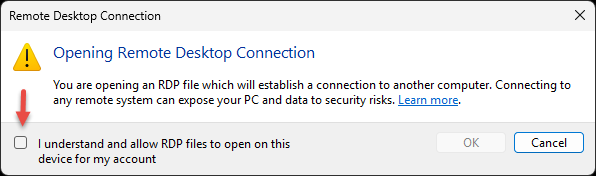
Select ‘Drivers’ and include ‘Clipboard’ and ‘Printer’ if these options are available.
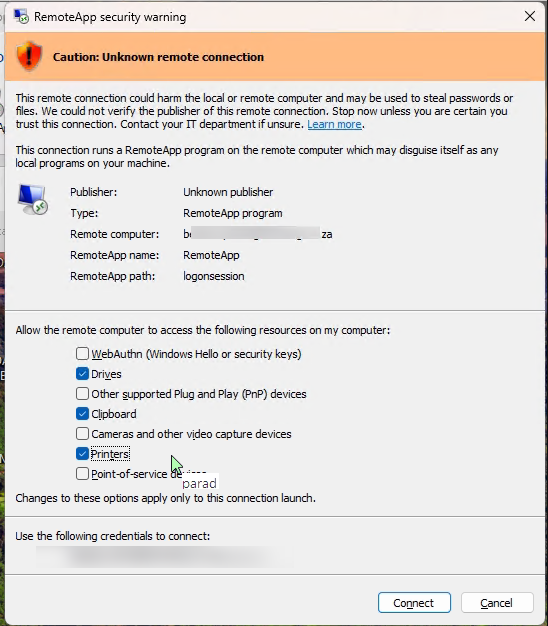
NB: If you cannot see the images, right click and download the image OR it has been blocked by your content blocker.
Was this article helpful?
That’s Great!
Thank you for your feedback
Sorry! We couldn't be helpful
Thank you for your feedback
Feedback sent
We appreciate your effort and will try to fix the article